Short answer
Sign in to Google AI Studio with your Google account, click Get API key, then Create API key, and copy it. Gemini has a free tier with daily limits, though Google doesn't offer it on every account or in every region.
How do I make a Gemini API key?
In Google AI Studio, in four steps.
- Go to Google AI Studio and sign in with your Google account.
- Click Get API key in the left sidebar.
- Click Create API key and select or create a Google Cloud project when prompted. If you don't have a project yet, click Create new project.
- Copy the key that appears. Keep it private, like a password.
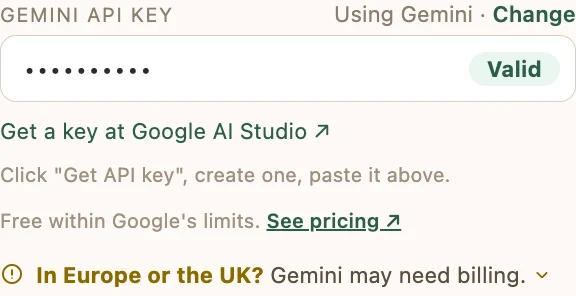
How do I use the key in Catchr?
Choose Gemini, then paste the key.
In Catchr, choose Gemini under Choose your AI and click Continue. Paste the key into Gemini API key. Catchr checks it right away and shows Valid. Already set up? Open Settings, click Change next to your key and paste the new one.
Is the Gemini API free?
Gemini has a free tier with daily limits, where Google offers it.
If you hit a limit, wait for it to reset. Google won't charge you unless you turn on billing for your key yourself. Google doesn't offer the free tier on every account. Current limits and prices are on Google's Gemini pricing page.
What does Google do with free-tier requests?
On the free tier, Google may use what you send to improve its AI, and its reviewers may read it.
Turning on billing for your key's project in Google AI Studio stops Google using it to improve its AI, though Google may still keep requests for a limited time to check for misuse. Google's free-tier terms also say not to submit personal, confidential, or sensitive information. Catchr removes the name and contact details it detects from your resume before sending it, though this can miss details.
My older Gemini key stopped working. What do I do?
Make a new key in Google AI Studio and paste it into Catchr.
Google is moving the Gemini API to a newer kind of key and has said it will stop accepting older keys. New keys made in Google AI Studio use the newer kind. Details are on Google's API key page.
Does it work in the EU or UK?
Yes, with billing turned on.
In the EU, Iceland, Liechtenstein, Norway, Switzerland, or the UK, Google allows only paid Gemini access. Turn on billing for your key's project in Google AI Studio before you use the key.
Common problems
Find the message Catchr showed you. The fix is next to it.
“Google isn't offering Gemini's free tier on this account. Set up billing in Google AI Studio, or switch to Claude or ChatGPT in Settings.”
Google doesn't give every account a free tier, and waiting won't change it. Turn on billing for your key's project in Google AI Studio, or switch to Claude or ChatGPT in Catchr's Settings.
“Your Gemini quota is used up for now. Wait a few minutes and try again, or check your limits in Google AI Studio.”
Your key has hit one of its limits. Free-tier keys have daily limits, and paid keys have rate limits too. Wait a few minutes and try again, or check your limits in Google AI Studio.
“Your Gemini key needs to be restricted to the Gemini API. Open it in Google AI Studio, click "Restrict to Gemini API" (or create a new key), then try again.”
Create a new key in Google AI Studio and paste it into Catchr's Settings. Google now makes new keys in its newer format and is retiring older keys, so a new key is the lasting fix.
“That key was rejected. Double-check it.”
The AI company turned the key down when Catchr checked it. Make sure you copied the whole key, and that it's for the AI you picked: a Gemini key won't work for Claude.
“Your Gemini API key looks invalid. Update it in Settings (⚙️).”
Open Catchr's Settings, click Change next to your key and paste the full key again. Check that nothing was cut off at either end. Lost it? Make a new key where you made the first one.
 Add to Chrome, it's free